Yes, you can get mods on Minecraft Bedrock Edition, but they go by a different name: add-ons. There are two ways to get them. You can download them from the in-game Marketplace, which works on every platform, or you can open a .mcpack or .mcaddon file, which works directly on Windows, Android and iOS. Either way, the last step is switching the add-on on in the world you want it in, and that's the step most people miss.
Everything below is current for Bedrock 26.52, the latest release on October 3, 2026.
Minecraft Bedrock mods are called add-ons
Mods in the strict sense are a Java Edition thing. Add-ons are Bedrock's counterpart, and they do the same kind of job: new mobs, items, blocks, recipes and mechanics, added to a new world or one you already have.
The two routes trade off like this:
- Marketplace add-ons work on every device, need no setup and mostly keep achievements on. Most of them cost money.
- Add-on files are free. They open directly on Windows and mobile, get onto consoles through a Realm, and turn achievements off.
Which one you can use depends on what you play on.
Which way works on your device
| Platform | Marketplace add-ons | Open add-on files directly | Files via a Realm | Currency |
|---|---|---|---|---|
| Windows 10/11 | Yes | Yes | Yes, and this is where you upload from | Minecoins |
| Android | Yes | Yes | Yes, by joining the Realm | Minecoins |
| iOS | Yes | Yes | Yes, by joining the Realm | Minecoins |
| Xbox | Yes | Use the Realm route | Yes, by joining the Realm | Minecoins |
| PlayStation | Yes | Use the Realm route | Yes, by joining the Realm | Tokens |
| Nintendo Switch | Yes | Use the Realm route | Yes, by joining the Realm | Minecoins |
Before you install anything, it helps to know three words, because the game's menus use all of them.
Add-ons, behavior packs and resource packs
Say you download a made-up dragon add-on. It would probably arrive as two packs:
- The resource pack makes it look and sound like a dragon. Resource packs handle textures, sounds and models.
- The behavior pack makes it fly, breathe fire and drop scales. Behavior packs handle how the game behaves: how mobs act, loot drops, spawn rules, items, recipes and trades.
An add-on is a resource pack, a behavior pack, or both together. A behavior pack can depend on a resource pack for its visuals, which is why a mob or furniture add-on usually comes as a pair. Turn on only the behavior half of the dragon and you get something that acts like a dragon with nothing proper to look at.
The files come in three flavors, all of them zip archives under a different name (Microsoft has a full list of Minecraft file extensions):
.mcpackis one pack, either a resource pack or a behavior pack..mcaddonis a bundle of.mcpackor.mcworldfiles. It's the usual way a whole add-on gets shared, so the dragon would likely come as one.mcaddonwith both halves inside..mcworldis a complete world, which can carry add-ons inside it.
Getting add-ons from the Marketplace
This is the easiest route and the only one that works the same on every device.
- Select
Marketplaceon the title screen. - Find the add-on you want.
- Pay with Minecoins.
- Select
Download.
For something you already own, go to Marketplace > My Library (the bookcase icon), open Owned or Marketplace Pass, and select Download. Then Activate Add-On! applies it to a new or existing world.
What it costs
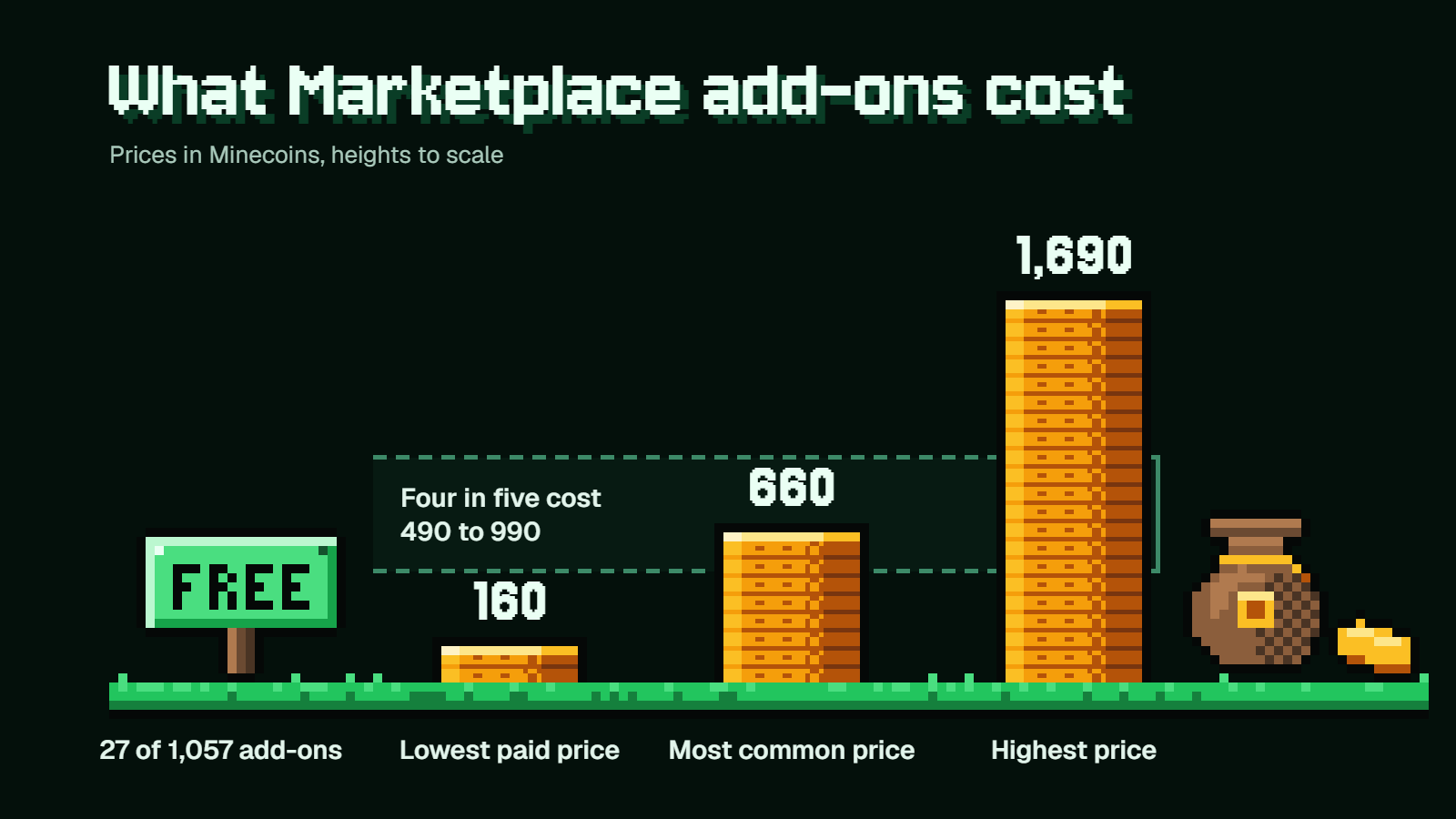
Going by the US catalog on October 3, 2026, paid add-ons run from 160 to 1,690 Minecoins. The most common price is 660, and four in five cost somewhere between 490 and 990. As examples, Tinkers' Construct 3.0 and Decocraft are 990 Minecoins each, and Naturalist Add-On is 1,340.
Free ones exist, but not many. On that date, 27 of the 1,057 add-ons in that catalog cost nothing, including Tinkers' Construct Lite, Another Furniture Add-On and Spark Pets Add-On (Lite). They're the obvious place to start if you only want to see what add-ons feel like.
There's also Marketplace Pass at $3.99 a month, with a 30-day free trial for new subscribers, except on Nintendo Switch. Its catalog includes add-ons.
If you came here after watching modded Java videos, look for Naturalist, Tinkers' Construct and Decocraft. They're official ports of well-known Java mods, made by or with the original creators.
Currency quirks on PlayStation and Switch
PlayStation doesn't use Minecoins. It uses Tokens, which only work on PlayStation and can't be converted to Minecoins or back.
On Nintendo, since October 27, 2026, Minecoins bought on Switch or Switch 2 can only be spent on Nintendo systems, and Minecoins bought on another device can no longer be spent on a Switch.
If you'd rather not spend anything, the other route is files.
Installing add-on files on Windows, Android and iOS
Free add-on files come from outside the game, not through the Marketplace, so you're trusting whoever made the file and wherever you downloaded it.
If the download arrives as a .zip, rename the extension before doing anything else: .mcpack for a pack, .mcworld for a world.
Windows 10 and 11
- Download the file.
- Go to the folder it saved in.
- Open the file. Minecraft launches and imports it.
World files can also be brought in from inside the game with Play > Import world on the Worlds tab.
Android
- Launch Minecraft.
- Download the file to your device.
- Open your device's Settings app and select
Storage>Exploreat the bottom, or use a file explorer app. - Open the folder the file saved in, usually
Download, and select the file. It opens in Minecraft.
iOS
- Launch Minecraft.
- Tap the file, whether it's a link or an email attachment.
- Tap
Open in Minecraft.
What success looks like
A .mcpack shows a pop-up saying it imported successfully. An imported .mcworld shows up as a world under Play. Microsoft's add-on getting started page walks through the same import process.
An imported pack isn't doing anything yet. It still has to be switched on in a world, which is covered two sections down.
Add-ons on Xbox, PlayStation and Switch
On consoles, add-ons arrive one of two ways.
The Marketplace. It works the same as on any other platform: buy, download, activate.
A Realm. You'll need a Windows 10 or 11 PC to set it up:
- On the PC, import the add-on files and turn them on in a world.
- Upload that world to a Realm.
- On the console, open the Realm world.
Anyone who joins the Realm, from any Bedrock device, downloads and applies its active add-ons automatically. So one PC in the house can feed file add-ons to every console in it.
The catch is the subscription. Realms is $3.99 a month for the owner plus 2 players at once, and Realms Plus is $7.99 a month for the owner plus 10. Friends you invite play free. On a console, online play also needs that console's own online subscription, which is sold separately. Realms Plus also includes the same catalog as Marketplace Pass, which softens the price a bit.
If you only have a console and no PC, the Marketplace is your route, and the free add-ons are where to begin. The Realm workaround only makes sense if someone in your group has a Windows PC and you'd want a shared world anyway.
Turning add-ons on in a world
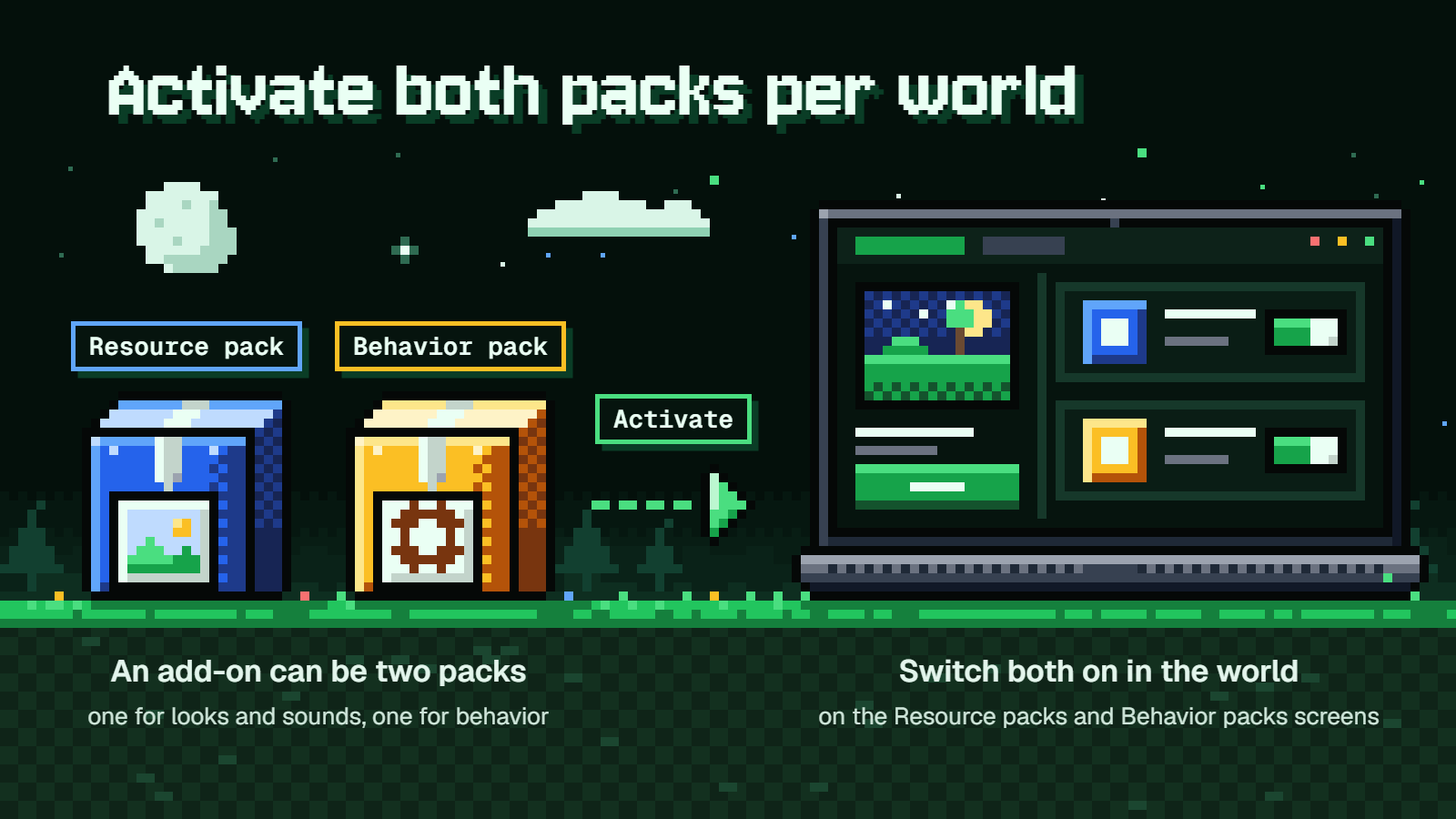
Whatever route you took, add-ons are switched on per world. Importing a file or downloading from the Marketplace only puts the pack on your device.
In a new world
- Select
Play. - Select
Create new worldon the Worlds tab. - Select
Create new worldagain on the "Create from..." screen. - Open
Resource packsorBehavior packs. - On the Available tab, select
Activateon the pack you want. - Select
Create.
In an existing world
- Select
Play. - Select the pencil icon on the world.
- Open
Resource packsorBehavior packs. - On the Available tab, select
Activate. - Select
Play.
If the add-on came as two packs, do this on both screens. Activate the dragon's behavior pack under Behavior packs, then check that its resource pack is active under Resource packs.
Order, limits and removing
When two packs change the same thing, the one highest on the Active list wins. If two add-ons both retexture the creeper, you'll see the top one's creeper. Drag packs to reorder them.
The recommended maximum is three add-ons at once. More can cut performance or cause conflicts.
To remove one, go to the same screen, open the Active tab, pick the add-on and select Remove. Be careful with this: removing an add-on removes its mobs from the world and replaces its blocks with default blocks. A house furnished with add-on furniture won't stay furnished. For any world you care about, try new add-ons on a copy first.
Experiments and achievements
Some file add-ons won't work until you switch on a toggle in the world's Game settings under Experiments, such as Beta APIs (on Microsoft's list as of version 1.21.80, and the list changes between versions). The game asks you to confirm with Turn on Experiments anyway.
Know what you're agreeing to:
- On an existing world, the game automatically makes a copy named "Copy of" plus your world name, and the experiment goes on that.
- The world gets an
Experimentaltag in the Worlds list. - It can't be switched back to a normal world, and it may crash or break with future updates.
Achievements follow a simple split. Since 2025, worlds with Marketplace add-ons can still earn them, on every platform, however many add-ons you run. Add-ons from anywhere else turn achievements off, and so do experiments and cheats. Turning on Allow Cheats kills them in that world permanently, even if you switch it off again. As of March 18, 2026, Mojang's achievement rules also switch them off in any world that is or ever was in Creative mode, is flat, or uses a world template or certain Marketplace add-ons, so check before committing a long-running Survival world.
To check, pause, select Settings and look at the World: Game section. If achievements are off, it says "Achievements cannot be earned in this world".
If your older worlds with Marketplace add-ons lost achievements on 26.50, that was a bug, and version 26.52 fixed it.
When the add-on imported but isn't there
Run through these in order:
- The file is a
.zip. Rename the extension to.mcpackor.mcworldand open it again. - It imported but nothing changed. It hasn't been activated in the world yet. Go back to the pencil icon.
- It looks wrong, or it looks right but does nothing. Only one half is active. Turn on both the behavior pack and the resource pack.
- Items or features are missing. The add-on may need an Experiments toggle.
- Things clash or the game chugs. Too many add-ons are active. Drop back to three or fewer.
- Friends can't join. Everyone needs to be on the latest Minecraft version.
Checking the pack folder on Windows
If you want to see whether a pack landed on your PC, press Win+R, paste this and select OK:
%appdata%\Minecraft Bedrock\users\shared\games\com.mojang
Imported packs live in behavior_packs and resource_packs.
A lot of older instructions send you to a path starting with %localappdata%\Packages\Microsoft.MinecraftUWP_8wekyb3d8bbwe. That stopped being the location at version 1.21.120 on October 28, 2025, when Minecraft moved its Windows folders and shifted existing worlds and content to the new place. If a tutorial points you there, you're looking in the wrong folder.
Which route to pick
If you're on console, grab a free Marketplace add-on first and only pay once you know you like how they play. If you're coming from Java videos, the official ports of Naturalist, Tinkers' Construct and Decocraft are the closest thing to what you saw, and Tinkers' Construct Lite lets you try one for nothing. If you're on Windows or mobile with a file already downloaded, import it, activate both halves in a copy of your world, and accept that achievements are off in that world.
FAQ
Are Bedrock add-ons free?
Some are. Add-on files from outside the game are free, and 27 of the 1,057 Marketplace add-ons in the US catalog were free on October 3, 2026. The rest cost 160 to 1,690 Minecoins, with 660 the most common price.
Do add-ons work in multiplayer or on a Realm?
Yes, they work in single-player, multiplayer and Realms worlds. Players joining a multiplayer world download its resource packs as they connect, and anyone joining a Realm gets its active add-ons automatically. Marketplace add-ons aren't supported on personal, non-Realms servers.
Can I use Java mods on Bedrock?
No. Java mods only run on Java Edition. What you can get are the official Bedrock ports on the Marketplace, such as Naturalist, Tinkers' Construct and Decocraft.
How do I delete a pack from my device?
Go to Settings > Storage > Resource Packs, select the item, select the trash can icon, then Delete.