There isn't one best Minecraft modpack; there's a best one for how you like to play. Six packs cover most tastes, and all six had a new release in 2026, so you're not picking up something abandoned. Find the line that sounds like you, then check that your PC can spare the memory before you install.
Which modpack to pick tonight
- A bit of everything: All the Mods 10
- Relaxed building and automation: Create Chronicles: The Endventure
- Story RPG: Prominence II: Hasturian Era
- Quest-driven, starting inside solid stone: FTB StoneBlock 4
- Vanilla that runs and looks better: Fabulously Optimized
- Zombie survival: DeceasedCraft (the complete version is v5.5.5 on Minecraft 1.18.2; the current beta can't be finished)
You might wonder why the most downloaded packs aren't on that list. Download counts are a poor guide. RLCraft is the most downloaded modpack on CurseForge, with more than 30 million downloads, but it was last updated on June 27, 2023, and runs on Minecraft 1.12.2. A pack that's still getting releases is a safer place to put a few weeks of your life.
If words like "loader" and "allocate" mean nothing to you yet, the next section sorts that out in a minute.
What a modpack is and why it isn't on the newest Minecraft
A modpack is a modded copy of the game that's ready to play: a list of mods bundled with the config files that make them work together. Somebody else has done the fiddly part.
Mods can't run on their own. They need a mod loader, and there are four: Forge, NeoForge, Fabric and Quilt. Every mod and every pack is set to one Minecraft version and one loader, and the two have to match.
You don't match anything by hand, though. A launcher downloads the pack, its mods, the right loader and the right Minecraft version, and keeps it all in its own separate instance. So you can have a 1.21.1 NeoForge pack and a 1.20.1 Fabric pack side by side, and neither touches the other or your vanilla worlds.
That version lock is also why big packs look "outdated." As of early October 2026, the newest Java Edition release is 26.3, from September 15. Five of these six packs run on 1.21.1 (August 2024) or 1.20.1 (June 2023). A pack with hundreds of mods needs every one of them on the same version, so pack makers settle on a version and stay there. Only Fabulously Optimized follows the current releases, and that's because it has no content mods to wait for.
The best Minecraft modpacks for each play style
All the Mods 10 - ATM10
This is the kitchen sink. Around 500 mods on Minecraft 1.21.1 with NeoForge, covering tech, magic and exploration, with quests to steer you and an endgame to aim for. You can spend one week on machines and the next on spellcasting without switching packs.
It suits you if you can't decide what you want, or if you want one pack to last for months. The catch is hardware. The ATM team asks for a PC with at least 16 GB of RAM, and that's a floor, not a nice-to-have. On an 8 GB machine, skip it.
Create Chronicles: The Endventure
A cozy pack built around Create, the mod where automation happens out in the world with cogs, belts and moving contraptions instead of inside menus. It adds Create addons, FTB Quests chapters, cooking that unlocks permanent heart upgrades, spells from Iron's Spells 'n Spellbooks, the Eternal Starlight dimension and built-in shaders.
The goal is light: collect 12 Ender Eyes, each crafted from 3 fragments you earn by beating bosses and completing automation tasks. The Eyes open the End Portal, and going there is optional. Recipe changes are minimal, so what you know from vanilla still applies.
The catch is that vanilla enchanting is disabled in favor of Create: Enchantment Industry, so you'll be building your enchanting setup instead of dropping a table and some bookshelves. If the whole pack sounds too gentle, the same author's Create Chronicles: Bosses and Beyond is the tougher sister pack, with full progression and gated unlocks.
Prominence II: Hasturian Era
This one plays more like an RPG than like modded Minecraft. There's a quest campaign with two storylines, The Void's Invasion and The Hasturian Era, plus a capital city, the Kingdom of Vaaz, with voice-acted NPCs. You level up, enemies scale with you, and there are artifact weapons and timed Mythic boss challenges.
Instead of picking a class, you build through a Talent Tree with 10 fates. Tech and magic mods are both in there and both optional, so you can ignore factories entirely and just adventure.
It runs on Minecraft 1.20.1 with Fabric. The catch: if your idea of fun is a quiet base and a sorting system, the story and combat focus may feel like it's pulling you away from that.
FTB StoneBlock 4
You start enclosed in solid stone and dig your world out. It has five starting islands to choose from, six Foundation Chapters of branching questlines, handcrafted Vaults with puzzle, combat and endurance trials, and the World Engine, a multiblock with over 15 upgrades. Create, Mekanism, Ars Nouveau, Occultism, Draconic Evolution and The Twilight Forest are all part of it.
Pick this if you like always having a next quest. It's on Minecraft 1.21.1 with NeoForge, and the official FTB StoneBlock 4 page has the pack details. The catch is the premise itself: there's no open world to wander at the start, and some people find that cramped.
Fabulously Optimized
No new blocks, no new mobs, no content mods at all. It's a performance and graphics pack built on Sodium, Lithium and other performance mods, and it supports most OptiFine features, including shaders, connected textures and zoom.
Because it changes nothing about the game itself, it works in any world and on any server. As of early October 2026, the stable version is for Minecraft 26.2, with an alpha for 26.3. The catch is obvious: if you're bored of vanilla, this won't fix that. It's also Fabric only, with no Forge, NeoForge or Quilt version planned.
DeceasedCraft - Urban Zombie Apocalypse
Zombie survival in the spirit of Project Zomboid and 7 Days to Die. You get a procedurally generated city in 5 hand-crafted districts, over 100 weapons and guns, vehicles to restore or build, and tech based on Create and Immersive Engineering. The story goal is to reach the radioactive Wasteland and find the cure.
The catch is a big one. The current beta on Minecraft 1.20.1 (Beta 5.10.17 in early October 2026) can't be finished. The Wasteland and Abyss districts are missing from v5.10 and later, so the endgame and high-tier gear aren't available. If you want the full run to the cure, install v5.5.5 on Minecraft 1.18.2 instead.
One more thing: don't add OptiFine to it. The pack already includes Embeddium for performance.
Version, loader, RAM and where to install each pack
| Pack | Minecraft | Loader | RAM to allocate | Install from | Latest version |
|---|---|---|---|---|---|
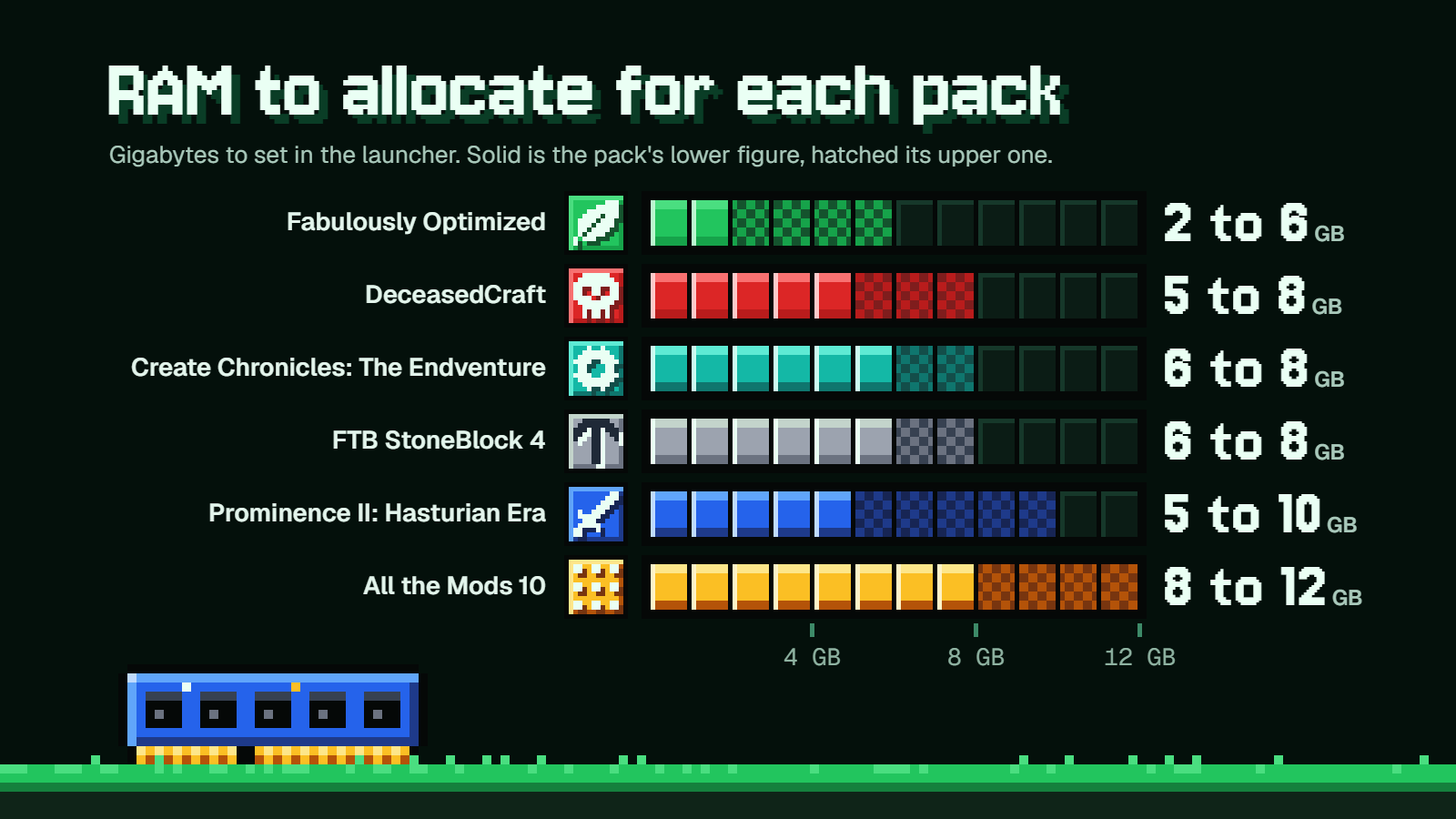
| All the Mods 10 | 1.21.1 | NeoForge | 8 to 12 GB | CurseForge | 8.2 (Sep 22, 2026) |
| Create Chronicles: The Endventure | 1.21.1 | NeoForge | 6 to 8 GB | CurseForge | 2.0.0 (May 19, 2026) |
| Prominence II: Hasturian Era | 1.20.1 | Fabric | About 5 GB on an 8 GB PC; around 9 GB on a bigger one; never over 10 GB | CurseForge or Modrinth | v4.1.2 (Oct 1, 2026) |
| FTB StoneBlock 4 | 1.21.1 | NeoForge | 6 GB minimum, 8 GB recommended | FTB App (also on CurseForge) | 1.22.0 (Sep 22, 2026) |
| Fabulously Optimized | 26.2 stable; 26.3 in alpha | Fabric | 2 GB light use, 4 GB for most, 6 GB for shaders or high render distance | CurseForge App, Modrinth App, Prism Launcher, MultiMC | 14.1.0 (Sep 13, 2026) |
| DeceasedCraft | 1.20.1 beta; 1.18.2 complete | Forge | 5 GB minimum, 8 GB recommended | CurseForge | Beta 5.10.17 (Jul 17, 2026) |
Forge and NeoForge are separate loaders, despite the names. DeceasedCraft is the only Forge pack here. The versions in the table are the ones current in early October 2026.
How much RAM to give your pack
Two numbers get mixed up all the time: the RAM in your PC, and the RAM you allocate to Minecraft inside the launcher. The table lists the second one.
Say your PC has 16 GB and you want to play ATM10. You give the pack 8 GB in the launcher. The other 8 GB stays free for Windows, Discord and the browser tab with the wiki open. Now picture the same pack on an 8 GB PC: handing it 8 GB would leave nothing for the system, which is why the ATM team says never to allocate all of your PC's RAM.
Why more isn't better
It's tempting to drag the slider to the top. Don't. FTB doesn't recommend more than 10 GB for any pack, because too much RAM causes stuttering and performance issues. The ATM team caps its packs at 12 GB, and their RAM and launcher guidance sets out the full requirements. CurseForge shows a warning once you go above 75% of your PC's total memory, which is 12 GB on a 16 GB machine and 6 GB on an 8 GB one.
For Fabulously Optimized, the team says extra RAM usually isn't needed, and their performance page lays out the 2, 4 and 6 GB tiers.
Why the default can be too low
The CurseForge app gives modpacks 4 GB by default. It can switch to the pack author's recommendation when there is one: ATM10 version 8.2 asks for 8196 MB and Create Chronicles: The Endventure 2.0.0 asks for 8192 MB, both about 8 GB. If a big pack crawls or crashes on load, check that the 4 GB default isn't still in place.
Where the slider is
- CurseForge app: a slider in the app's Minecraft settings changes it for all packs, or open one modpack's own settings to change just that one.
- FTB App: select the pack, click the settings button on the right, and drag the
Instance Memoryslider. FTB packs ship with tuned values already, and FTB says never to set-Xmxby hand in its app. - Modrinth App: there's a memory slider in the global settings and in each instance's settings.
- Prism Launcher: it's in the
Memorysection of the Java settings.
How to install a modpack
All six packs are on CurseForge, so start there. The CurseForge app sets up its own installation of the game, so you don't need Minecraft installed first, and it installs the Java the game needs for you.
- Open the CurseForge app and go to
DiscoverorBrowse. - Search for the pack by its exact name.
- Click
Installand let it download the mods, the loader and the matching Minecraft version. - Open
My Modpacks, where the pack now appears. - Check the pack's memory setting against the table above, then launch it.
You still need a Microsoft account that owns Minecraft: Java Edition. The launcher handles the mods, not the license. Playing on Bedrock instead? These packs won't run there, but Bedrock has add-ons that do a similar job.
For FTB StoneBlock 4, the FTB App is the home launcher: select Browse, search for the pack, click Install and pick a version. The FTB App can also find CurseForge modpacks.
In the Modrinth App, click Browse, then Install on the pack. That covers Prominence II: Hasturian Era and Fabulously Optimized.
Playing with friends
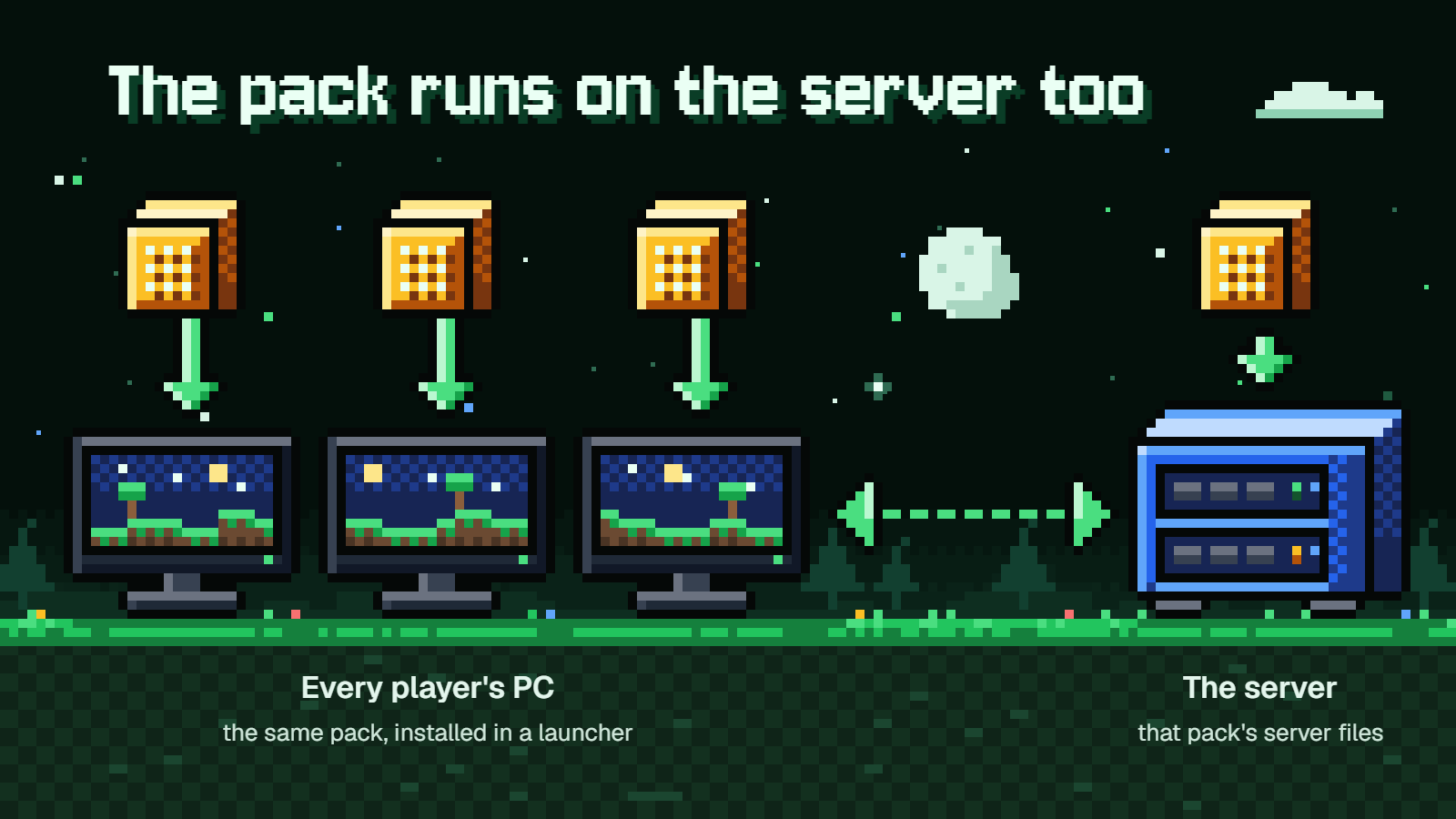
The five packs that add content have to run on the server too. Each one publishes separate server files, called a server pack, and every player joins from the same pack installed in their own launcher.
On CurseForge, the server files are on the website under Files, in the Additional Files of the version you picked. For Prominence II, the server pack is only on CurseForge, but friends who installed the pack from Modrinth can still join.
A server pack is not a game install, so nobody should play from it. DeceasedCraft's page warns about this directly, because its server pack lacks the client optimization mods.
The published server RAM figures:
- All the Mods 10: at least 6 GB allocated. The server files start with
startserver.batorstartserver.shonce you've accepted the EULA. - Prominence II: Hasturian Era: at least 8 GB for 3 to 4 players, plus 1 GB per extra player. A group of six would want about 10 GB.
- DeceasedCraft: 8 GB minimum, 10 GB or more recommended.
FTB StoneBlock 4 has the easiest route. You can start an FTB Worlds server from the in-game Multiplayer tab, with no port forwarding. FTB Worlds is a paid service, $20 a month in early October 2026. If you'd rather host it yourself, FTB's Server Installer downloads the right Java and you start the server with run.bat on Windows or run.sh. Either way, a self-hosted server needs command blocks turned on in server.properties, or some structures won't work:
enable-command-block=true
DeceasedCraft needs command blocks enabled on a hosted server as well. Its page also advises against LAN multiplayer and says to host with the included server pack.
Fabulously Optimized is the odd one out, since it needs no server pack at all. It works on every server that allows vanilla clients. To share a single-player world, press Esc and choose Open to Internet. Your friend needs the same Minecraft version, but not the pack.
Which one should you start with
For a first modpack, go with Create Chronicles: The Endventure. Recipes barely change, the goal is optional, and Create teaches you automation by showing it to you in the world. If you only want to learn how launchers work before committing, Fabulously Optimized is a quick warm-up.
For a weak or 8 GB PC, pick Fabulously Optimized, or Prominence II: Hasturian Era at about 5 GB if you want real content. All the Mods 10 is one of the most downloaded packs on CurseForge, but it isn't an honest pick for a machine like that.
For a friend group, FTB StoneBlock 4 gets my vote. FTB Worlds, the paid option, means nobody has to learn port forwarding, and the quests give a group shared goals. Prominence II is the runner-up if your friends would rather follow a story.
For a long quest-driven grind, pick All the Mods 10 if your PC has 16 GB or more. It's the biggest pack of the six. If you prefer a tighter, more directed path, StoneBlock 4 again.
DeceasedCraft is the specialist pick. Take it if zombies are the whole point for you, and decide up front whether you want the newer beta or the version you can finish.
FAQ
Can I allocate too much RAM?
Yes. Too much causes stuttering, and it starves the rest of your system. FTB advises against more than 10 GB for any pack, the ATM team says never more than 12 GB, and Prominence II's developers say not to go over 10 GB.
Which of these runs on a PC with 8 GB?
Fabulously Optimized fits easily at 2 to 4 GB. Prominence II: Hasturian Era is meant to get about 5 GB on an 8 GB PC. DeceasedCraft's 5 GB minimum fits on paper, but that's the minimum and not the recommended 8 GB. All the Mods 10 is out.
Do my friends need the same pack installed?
For the five content packs, yes: same pack, installed through a launcher, matching what the server runs. Fabulously Optimized is the exception, because it only changes things on your own PC.
Forge or NeoForge: does it matter to me?
Not while you're installing packs, because the launcher picks the right loader. It matters if you add extra mods yourself. A mod has to match both the pack's loader and its Minecraft version, so a Forge mod won't go into a NeoForge pack.
Which version of DeceasedCraft should I install?
Install v5.5.5 on Minecraft 1.18.2 if you want to play through to the cure. Install the current beta on Minecraft 1.20.1 if you'd rather have the newest build and don't mind that the endgame isn't there yet. The pack's page says v6.0 is still to come.