
Not automatically. "Optical" tells you how a key press gets detected, and that's a different thing from how early the key fires or how long the switch survives. Some optical switches are quick and tough, some mechanical ones match them, and the speed trick you'd notice in a shooter belongs to a third kind of switch.
Are optical switches better than mechanical for gaming?
An optical switch reads your press with a beam of light instead of two bits of metal touching. That design has one real advantage: metal contacts bounce when they meet and light doesn't, so the keyboard doesn't have to wait out the bounce before trusting the signal.
What it doesn't do is make every optical switch faster or longer-lived than every mechanical one. Put the makers' own spec sheets next to each other and you'll find a mechanical switch that fires as early as a well-known optical one, and an optical switch that fires as late as a standard red.
If you're after something you can feel in a match, look at switches that sense how far down the key is. That means Hall effect, or the analog version of optical. A plain optical switch is still just on or off.
One note on wording: makers throw "mechanical" around loosely, and Corsair even sells an "Optical-Mechanical" board. Here, mechanical means metal-contact switches only.
How optical switches register a key press
Picture your W key on a regular mechanical board. Inside the switch are two metal contacts sitting slightly apart. As you push W down, the stem brings them together, the circuit closes and the keyboard tells your PC you're moving forward. Cherry calls its version of that contact Gold Crosspoint, and the signal fires partway down the press, before the key hits the bottom.
Now the same W key on an optical board. There's no contact pair, just a light beam and a sensor, and the stem acts as a shutter.
The direction depends on the maker. In Razer's optical switches, pressing the key lets the beam pass through the stem, and that's the moment it actuates. Corsair's OPX works the other way around: a piece of plastic moves down and blocks a laser, and the blocked beam is the keystroke. Gateron uses an infrared sensor that the stem either blocks or uncovers as it moves.
From your finger's point of view nothing changes. There's still a spring, a stem and a keycap. The difference is only in what happens at the bottom of the switch, and it matters because of one annoying habit metal contacts have.
Debounce, and whether optical removes it
When two metal contacts come together, they don't meet cleanly. As they approach, touch and separate, the signal can fire several times within a single press. Corsair's example is an old keyboard that types the same letter 3 or 4 times when you hit the key once.
Keyboards fix that in firmware with a debounce delay, a short wait that filters out the extra signals so one press counts as one press.
Light has nothing to bounce. Razer, Corsair, Logitech and SteelSeries all say the same thing about their optical switches: no bounce, so no debounce delay needed. That part of the optical pitch holds up.
How much time it saves is where it gets murky, because the makers don't agree on how slow a contact switch is in the first place:
- Cherry says its Gold Crosspoint contact has a debounce time of less than 1 millisecond.
- Wooting says contact switches have a minimum input delay of 5 milliseconds because of bounce.
- SteelSeries says traditional mechanical keyboards average around 6 milliseconds of response time at best.
These are each company's own claims, and they aren't measuring the same thing. Cherry is describing one contact in its own switch. SteelSeries is describing a whole keyboard taking several scans of each key before it believes the press. So the gap between a good mechanical board and an optical one could be tiny or it could be a few milliseconds, depending on whose number you trust and how the board's firmware is set up. It's not something to count on feeling.
Cherry MX2A, Razer Linear Optical, Corsair OPX and Gateron KS-15 side by side
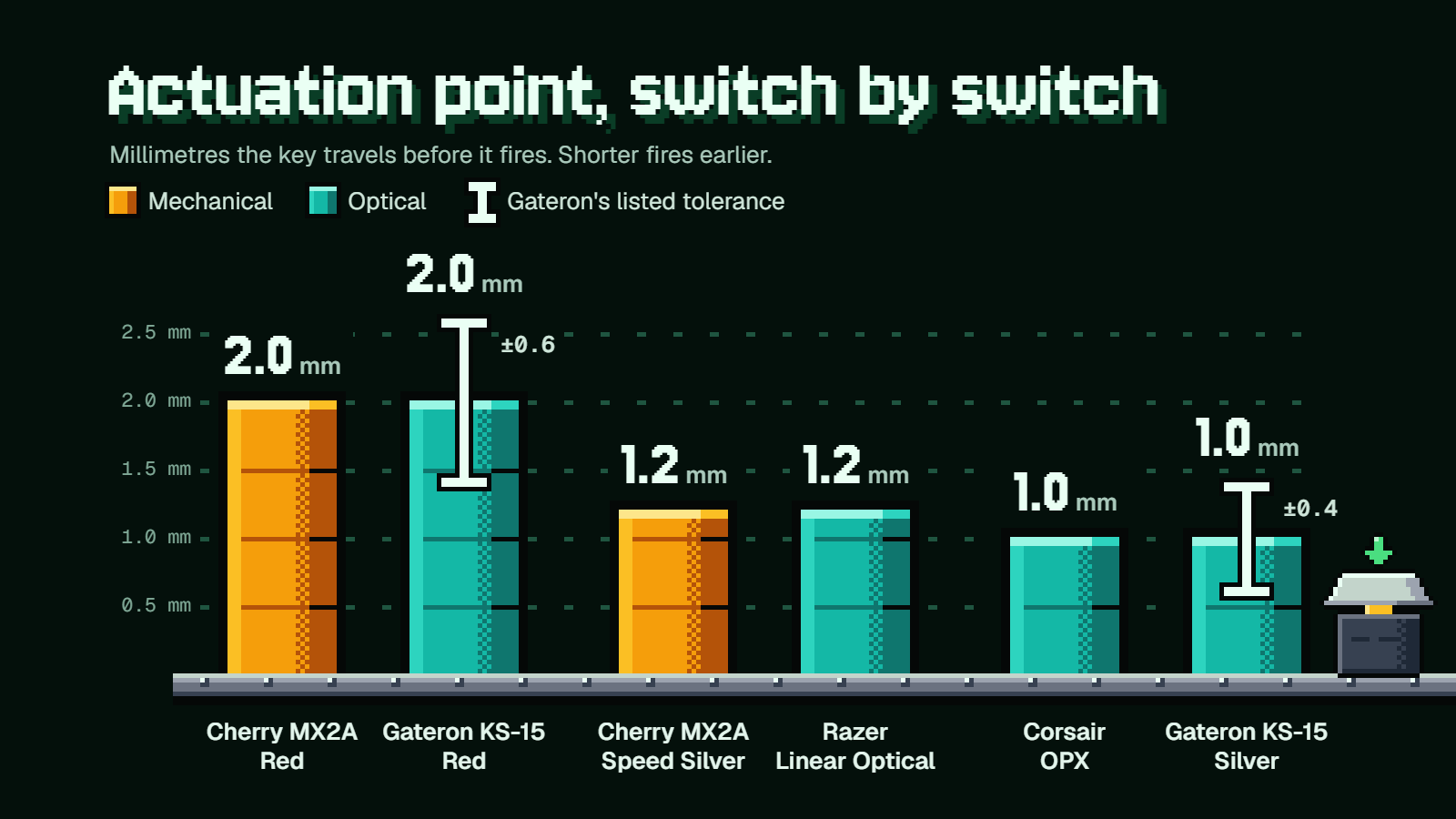
Actuation point and force are much easier to compare than milliseconds, because every maker publishes them. Here are the linear switches from each, starting with the Cherry MX2A Red that most people think of as the default.
| Switch | Type | Actuation | Force |
|---|---|---|---|
| Cherry MX2A Red | Mechanical, linear | 2.0 mm | 45 cN |
| Cherry MX2A Speed Silver | Mechanical, linear | 1.2 mm | 45 cN |
| Razer Linear Optical | Optical, linear | 1.2 mm | 45 g |
| Corsair OPX | Optical, linear | 1.0 mm | 45 g |
| Gateron KS-15 Red | Optical, linear | 2.0 mm (±0.6) | 45 gf (±15) |
| Gateron KS-15 Silver | Optical, linear | 1.0 mm (±0.4) | 45 gf (±15) |
Cherry treats centinewtons and grams as the same thing, so all six are the same weight under your finger.
Look at the actuation column and the "optical is faster" idea falls apart pretty quickly. Cherry's Speed Silver is a metal-contact switch and it fires at 1.2 mm, exactly where Razer's Linear Optical does. Gateron's optical Red fires at 2.0 mm, the same as a Cherry MX2A Red. Only Corsair OPX and the KS-15 Silver get down to 1.0 mm.
Even there, keep the gaps in proportion. OPX actuates a full 1.0 mm earlier than an MX2A Red, which is a real difference in how soon the key fires. Against Speed Silver or Razer Linear Optical, the lead is 0.2 mm.
Gateron's tolerances are worth a second look too. A ±0.4 mm band on a 1.0 mm actuation point means a KS-15 Silver could fire anywhere from 0.6 mm to 1.4 mm and still be in spec. That band is four times as wide as the 0.2 mm gap between it and the two 1.2 mm switches in the table.
Travel and bottoming out
Actuation is where the key fires. Total travel is how far it goes before it stops. The MX2A Red travels 4.0 mm, Speed Silver 3.4 mm and Corsair OPX 3.2 mm. Gateron's KS-15 Red goes to 4.0 mm at most, and the Silver to 3.2 mm.
So OPX has 0.8 mm less travel than an MX2A Red, which Corsair describes as 20% shorter than the usual 4.0 mm. Corsair also argues from distance on actuation: 1.0 mm is about half the normal 2.0 mm, so the press registers twice as quickly. That's reasoning from how far your finger moves, not a stopwatch reading, and it assumes you press at the same speed either way.
Corsair and Wooting both make the point that takes some shine off: most people push the key all the way to the bottom no matter where it actuates. Your press on a 1.0 mm switch still fires earlier in the stroke, but your finger carries on down and has to come all the way back up before the next press. Shorter total travel helps a little with that. A lower actuation point alone doesn't.
There's a trade-off as well. A key that fires after 1.0 mm is easier to set off by accident. If you rest your fingers heavily on WASD or type with a heavy hand, a very short actuation point can mean stray presses, so think about your own habits before chasing the smallest number.
Do optical switches last longer?
Corsair says that without two copper plates hitting each other, the switch's lifespan is doubled. Razer says its optical design nearly eliminates switch degradation. The ratings are less dramatic.
Cherry rates MX2A Red and Speed Silver for more than 100 million keystrokes. Razer rates its Linear Optical at 100 million. Those are level. Corsair OPX at 150 million is the only switch of the bunch that's ahead, and Corsair is also the one maker with a clear gap inside its own lineup, since its MLX Red mechanical switch is rated at 80 million.
Take all of these with a grain of salt. Wooting, which makes keyboards itself, says a lot of manufacturers don't press a switch that many times and give an estimated total instead.
And put the numbers next to your own use. Say you hammered your W key 10,000 times every single day, which is a lot. Reaching 100 million would take about 27 years. Any switch here is rated far past the point where you'll have replaced the keyboard for other reasons, so don't let lifespan decide this.
Feel, sound and how much choice you get
Optical isn't linear-only. Gateron's KS-15 range covers all three feels: several linears, a tactile Brown with a bump you can feel, and a clicky Blue that adds the click. Razer's optical range is narrower, linear or clicky, and its tactile Orange switch is a mechanical one.
Smoothness out of the box can differ. Cherry lubricates the MX2A Red and Speed Silver at the factory, while Gateron's KS-15 switches aren't pre-lubed.
Where mechanical wins clearly is variety. A standard hot-swap board takes most 3-pin and 5-pin MX-style switches from several makers, so if you don't love what came with your keyboard, there's a huge shelf of weights, bumps and sounds to pick from. With optical, you're choosing from whatever fits that particular board, and that's usually a short list.
Will optical switches fit a hot-swap keyboard?
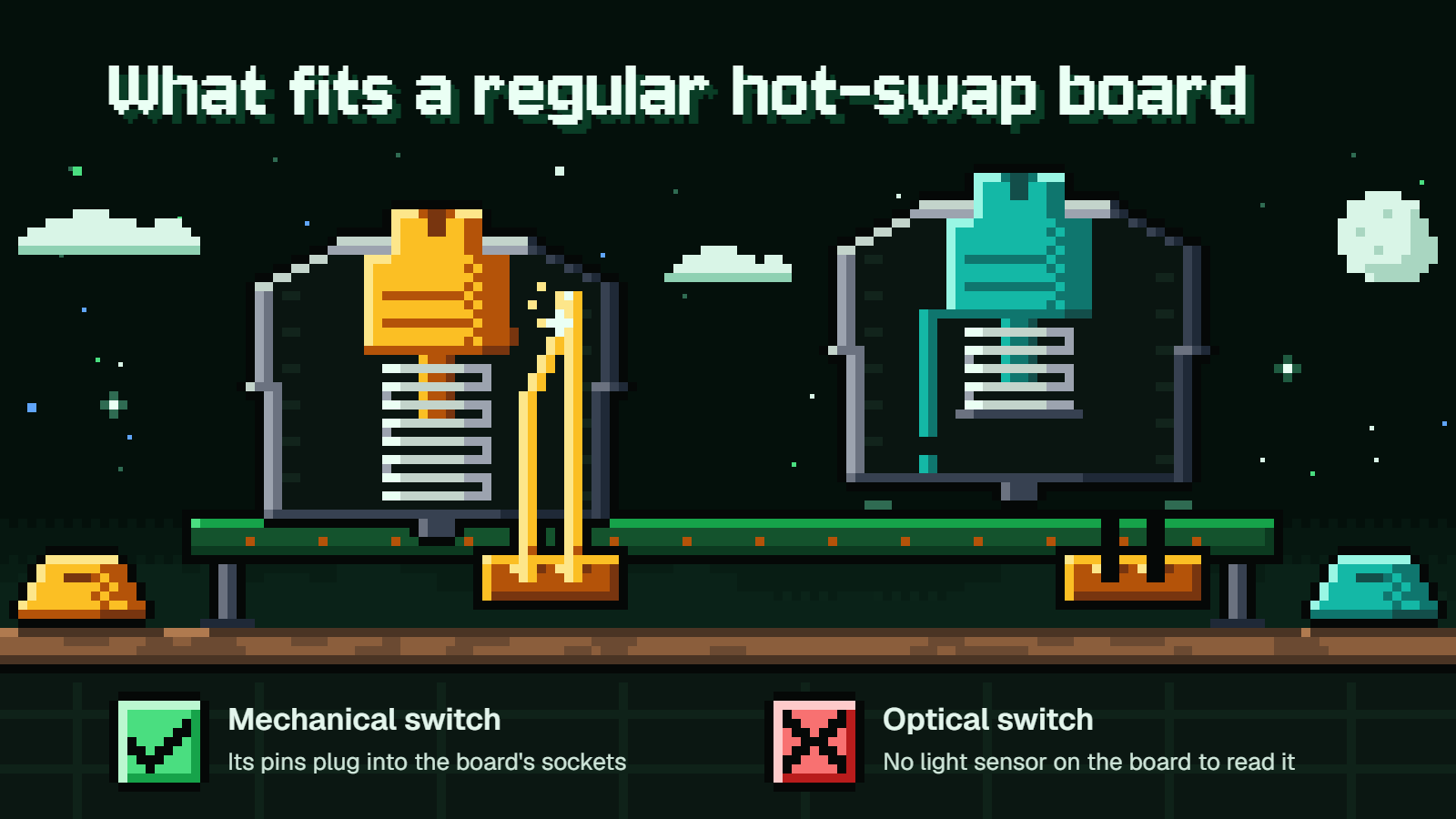
No, not a regular one. Gateron puts it bluntly on the KS-15 optical switch page: "Gateron Optical Switches are not compatible with regular mechanical keyboards."
It works the same in the other direction. Keychron says its optical board isn't compatible with any MX-style mechanical switch, and the Gateron optical switches it sells have no pins at all, so there's nothing to go into a standard socket. Wooting sums up the general rule: common hot-swap keyboards only take contact switches, meaning regular mechanical ones.
Here's how that goes wrong. Say you own a standard hot-swap board with red switches, you read that optical is faster, and you order a pack of KS-15 Silvers, which come in packs of 35 or 105. They arrive, and they can't register a single press in your board, because it has no light sensors under the keys.
It gets stricter than that. Even inside optical, generations don't mix: Gateron says its newer KS-22 optical switch is not to be used to replace the KS-15. Hall effect boards are their own island too, taking only magnetic switches.
So when you pick a board, you're picking the family of switches you can ever put in it. The one thing that does carry over is keycaps, at least on Corsair's side: regular keycaps fit OPX switches, so a set you already like can move across.
What Hall effect and analog optical add
A Hall effect switch has a magnet at the bottom of the stem and a sensor on the circuit board that reads how far away the magnet is. The keyboard knows whether W is 0.5 mm down or 3 mm down, and that opens up two features. Wooting has a clear explainer on Hall effect switches if you want the deeper version.
The first is adjustable actuation. On Corsair's MGX Hyperdrive, SteelSeries' OmniPoint 3.0 and the Wooting 80HE, you can set the actuation point anywhere from 0.1 mm to 4.0 mm. You could have WASD fire at a light touch and your ultimate key need a deep press. Corsair's own recommended range for accuracy is 0.3 mm to 3.6 mm, so the extreme ends are more of a headline than a setting to live on.
The second is Rapid Trigger, and it's the one shooter players care about. Wooting's example: a fixed switch with 4 mm of travel and a 1 mm actuation point, pressed to the bottom, has to come back up as much as 3 mm before it switches off. With Rapid Trigger, the key resets as soon as it starts moving up, after as little as 0.1 mm.
Think about counter-strafing. You're holding A, you want to stop dead and shoot, so you let go of A and tap D. On a fixed switch, the game thinks you're still holding A until the key has climbed most of the way back. With Rapid Trigger, A is released almost the moment your finger lifts.
Plain optical switches can't do either of these. They have a fixed actuation point, like a mechanical switch, or a choice of two in the case of SteelSeries' OptiPoint (1.0 mm or 1.5 mm). The optical route to the same features is Razer's Analog Optical Gen-2, which measures how much light passes through the stem, adjusts from 0.1 mm to 4.0 mm and has a Rapid Trigger Mode.
SteelSeries shows how little raw response time matters next to this. Its own readings put its OptiPoint optical switch at 0.2 ms and its OmniPoint 2.0 Hall effect switch at 0.54 ms, and it still says the Hall effect switch gives better results, because its actuation point can be set lower.
Which to pick
You mostly play competitive shooters and you're buying a new board: go Hall effect or analog optical. Rapid Trigger and adjustable actuation are the features neither plain optical nor mechanical can offer. Wooting's advice for this crowd is linear switches with a force in the 35 to 45 gf range, skipping tactile and clicky.
You type a lot, play a mix of games, or like swapping switches: go mechanical. You get the widest choice of feels and a hot-swap standard that lots of makers build for. If you want an early-firing key, Cherry MX2A Speed Silver gets you 1.2 mm without leaving that ecosystem.
The board you like happens to come with plain optical switches: that's a fine pick, as long as you're happy with the switches it ships with and don't plan to change them. Of the ones compared here, Corsair OPX has the strongest spec sheet, with the 1.0 mm actuation, 3.2 mm travel and 150 million rating.
The makers pitch them along the same lines. Corsair aims OPX at FPS players and its MGX Hall effect switches at people who want control over every setting. Cherry, whose name is built on mechanical switches, calls magnetic boards technically superior for pro gamers and says mechanical remains a strong choice for typing and tactile feedback.
FAQ
Can I put optical switches in a regular hot-swap keyboard?
No. Standard hot-swap sockets are built for metal-contact switches, and optical switches need a board with light sensors under each key. Gateron says outright that its optical switches aren't compatible with regular mechanical keyboards.
Do optical switches have Rapid Trigger?
Plain ones don't, because they only know on or off at one fixed point. Rapid Trigger needs a switch that senses position, which means Hall effect or an analog optical switch such as Razer's Analog Optical Gen-2.
Are optical switches only linear?
No. Gateron's KS-15 optical range includes linear, tactile (Brown) and clicky (Blue) versions. Razer's optical switches come as linear or clicky.
Will my keycaps fit optical switches?
On Corsair OPX, yes. Corsair says regular keycaps fit OPX switches, so an existing set can move over.
Is a 1.0 mm actuation point always better for games?
Not for everyone. It fires earlier in the press, but most people bottom out anyway, and a key that light on the trigger is easier to press by accident if you rest your fingers on it.